If you have ever missed a conference deadline because you forgot the date, miscalculated the timezone, or simply lost track of a call for papers buried in your inbox, you are not alone. Deadline management is one of the most frustrating parts of academic life, and most researchers cobble together a mix of bookmarks, spreadsheets, and calendar events to keep up.
PaperPilot was built to solve exactly this problem. It gives you a live, always-visible deadline tracker right inside your browser so you can focus on writing instead of worrying about when things are due.
How do I install PaperPilot from the Chrome Web Store?
Head over to the PaperPilot Chrome Web Store page and click "Add to Chrome." The extension is completely free and takes a few seconds to install. Once installed, you will see the PaperPilot icon in your browser toolbar.
PaperPilot works best with Overleaf, but the deadline tracking features are available on any page. You do not need an Overleaf account to start tracking deadlines.
How do I see my deadlines at a glance?
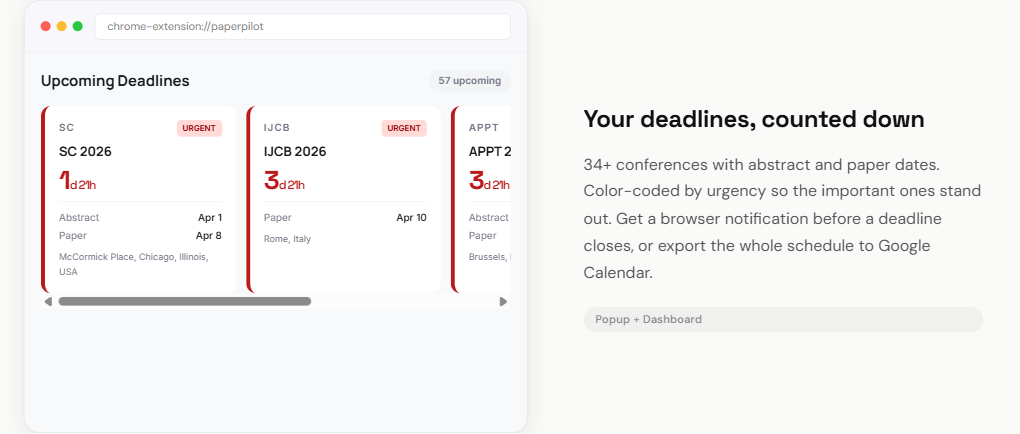
After installation, PaperPilot loads a curated set of top-tier conference deadlines automatically. Open Overleaf or click the extension icon, and you will see a deadline strip at the top of the page showing your upcoming deadlines in a compact, scrollable bar.
Each deadline is displayed with the conference abbreviation (like CHI, NeurIPS, or UIST), the submission date, and a live countdown that ticks in real time. There is no need to calculate "how many days until..." manually ever again.
How does the color-coded urgency system work?
PaperPilot uses a color-coded system so you can instantly gauge how much time you have left:
- Red - Less than 7 days remaining. This is crunch time. If you have not started your camera-ready draft, it is time to prioritize.
- Amber - Between 7 and 30 days. You have some breathing room, but this is when the serious writing should be happening.
- Green - More than 30 days. Plenty of time to plan, outline, and run experiments.
This visual system removes the cognitive load of deadline math. A quick glance tells you what needs attention right now.
How do I export deadlines to my calendar?
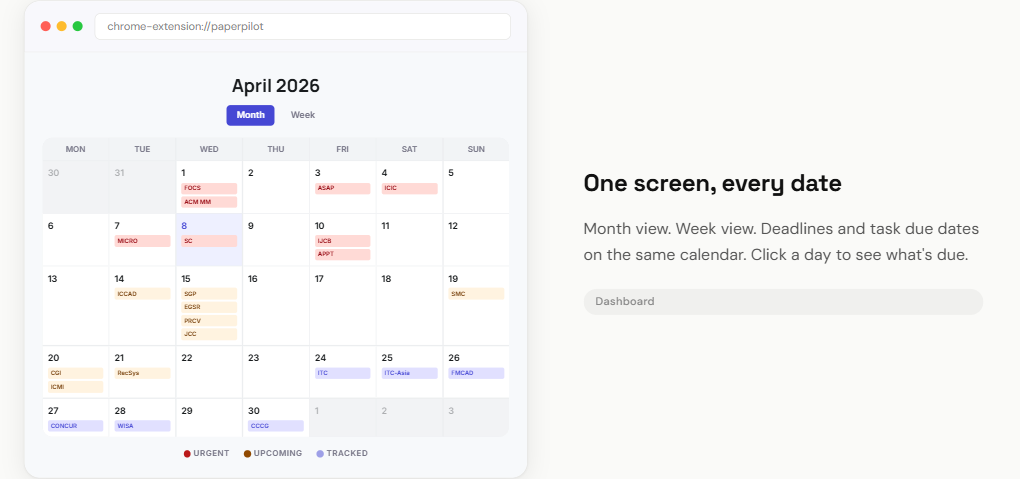
PaperPilot lets you sync deadlines with the calendar app you already use, so you get reminders in your native workflow.
How do I add deadlines to Google Calendar?
Click on any deadline card and you will see a "Add to Google Calendar" button. This opens Google Calendar with the event pre-filled - the conference name, submission deadline date and time, and a link back to the call for papers. One click and it is on your calendar with a reminder.
How do I export deadlines as .ics files?
Prefer Apple Calendar, Outlook, or another app? PaperPilot also supports .ics export. Click the download icon on any deadline card to get a standard .ics file that works with virtually any calendar application. You can also bulk-export multiple deadlines at once.
How do I use the web-based deadline tracker?
In addition to the browser extension, PaperPilot offers a free, full-featured web-based conference deadline tracker with over 1,200 conferences across all major computer science fields.
The web tracker includes powerful filters that go far beyond simple lists:
- Field filters - AI, HCI, Systems, Security, Databases, Software Engineering, and more
- Rank filters - Filter by A*, A, B, or C tier conferences using ICORE 2026 rankings
- Organization filters - ACM, IEEE, USENIX, AAAI, and specific SIGs like SIGCHI or SIGPLAN
- Search - Multi-word search across conference names, abbreviations, locations, and dates
Every conference shows a live ticking countdown, and you can export any deadline to Google Calendar or download the .ics file directly from the web page.
Why should I track abstract and paper deadlines separately?
Many top conferences have separate abstract and paper submission deadlines, and missing the abstract deadline means you cannot submit the paper at all. PaperPilot tracks both dates and shows them clearly on each card, so you always know the real first deadline you need to hit.
This is one of the most common reasons researchers miss submissions - they plan for the paper deadline without realizing the abstract was due a week earlier.
How does PaperPilot handle timezone differences?
Conference deadlines are often listed in AoE (Anywhere on Earth) or UTC, which can be confusing if you are in a different timezone. PaperPilot automatically converts all deadlines to your local time. You will see both the original timezone and your local equivalent, so there is never any ambiguity about when exactly a deadline closes.
How do I start tracking deadlines today?
The best time to set up your deadline tracker is before the next submission cycle begins. Install PaperPilot for free and take five minutes to review your upcoming deadlines. You will wonder how you ever managed without it.
If you prefer a standalone page, try the web-based deadline tracker - no installation required, and it covers over 1,200 conferences with live countdowns and calendar export.