Writing a research paper involves dozens of moving pieces: literature reviews, experiment designs, data analysis, figure creation, writing, revisions, and formatting. Most researchers track all of this in their heads or in scattered to-do lists. The result is that important tasks slip through the cracks, especially when you are working on multiple papers at once.
A kanban board - the same visual workflow system used by software teams - turns out to be a perfect fit for managing the research paper pipeline. PaperPilot brings kanban boards directly into your Overleaf workflow, so you can see the status of every paper at a glance without leaving your writing environment.
Why does kanban work for research?
The kanban method was originally developed for manufacturing, but its core idea is universal: visualize your work, limit what you do at once, and move items through stages until they are done. For research, those stages map naturally to the paper lifecycle:
- Ideas - Early-stage concepts and research questions worth exploring
- In Progress - Active writing, experiments running, or data being collected
- Under Review - Submitted to a conference or journal, waiting for decisions
- Done - Accepted, published, or archived
Seeing all your papers laid out in columns makes it obvious where your bottlenecks are. If your "In Progress" column has six cards and your "Ideas" column is empty, you might be overcommitted. If everything is in "Under Review," you have bandwidth to start something new.
How do I set up a project in PaperPilot?
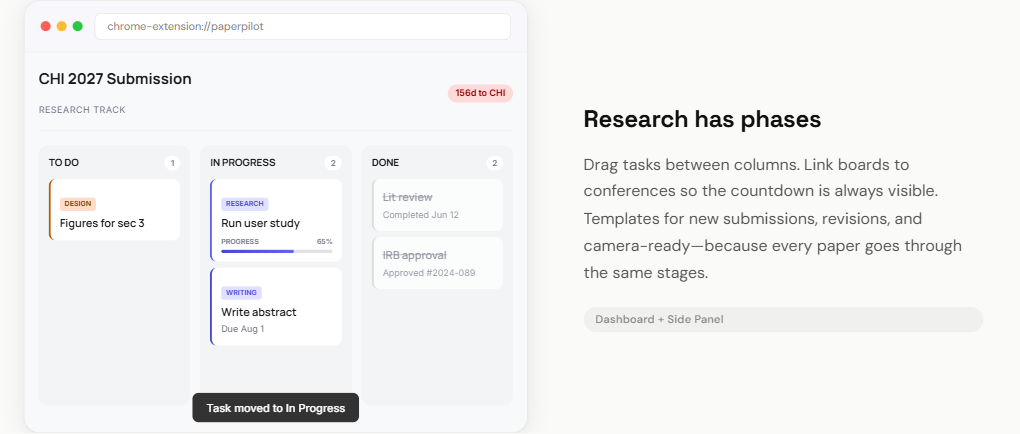
Creating a new project takes about 30 seconds. Open PaperPilot from the extension icon or the Overleaf side panel and navigate to the Board view. Click "New Project" and give it a working title - something like "User Study Paper" or "Attention Mechanism Survey" works fine. You can always rename it later.
How do I link a project to a conference deadline?
One of PaperPilot's most useful features is the ability to link a project to a specific conference deadline. When you create or edit a project, you can search for a conference by name or abbreviation. Once linked, the project card shows the conference name and a live countdown to the submission deadline, so you always know exactly how much time you have.
This connection between your project board and the deadline tracker is what makes PaperPilot different from a generic kanban tool. Your deadlines and your task management live in the same place.
How do I break down tasks for a paper?
Each project on the board can contain individual task cards. The goal is to break the paper into concrete, actionable pieces that you can check off as you go. Here is a typical set of tasks for a paper submission:
- Finish literature review
- Write abstract
- Design user study protocol
- Run pilot study
- Collect and analyze data
- Create figures and tables
- Write introduction and related work
- Write methodology section
- Write results and discussion
- Internal review with co-authors
- Format for camera-ready
Each of these becomes a card that you can drag between columns as it progresses. This is far more effective than a flat to-do list because you can see at a glance what stage each task is in.
What does a CHI submission workflow look like?
Let us walk through a realistic example. Suppose you are submitting a paper to CHI 2027. The paper deadline is in September, and you are starting in April.
April to May: Ideas and planning
Create your project in PaperPilot and link it to CHI 2027. Add task cards for your research questions, study design, and lit review. These start in the "To Do" column. Move "Literature review" to "In Progress" as you start reading and annotating papers.
June to July: Active research
Your lit review moves to "Done." The user study tasks move to "In Progress." As you finish the pilot and begin full data collection, drag those cards forward. The kanban board keeps you honest about whether you are on track - if it is July and the writing tasks have not started moving, you know you need to adjust.
August to September: Writing sprint
This is where the board is most valuable. Move writing tasks into "In Progress" one section at a time. Focus on completing each section rather than trying to write everything at once. The live countdown on your project card shows exactly how many days remain until submission, keeping the urgency visible without requiring you to check a separate calendar.
Post-submission
Move the entire project card to "Under Review." You can add notes about the submission date and any reviewer feedback as it comes in. If the paper needs revisions, move it back to "In Progress" with new task cards for addressing reviewer comments.
How do I manage multiple papers at once?
The real power of a kanban board emerges when you are juggling multiple papers. With PaperPilot's dashboard view, you can see all your active projects at once - each with its own linked deadline and progress indicator. This makes it straightforward to decide what to work on each day.
If you have a UIST paper due in three weeks and a CSCW paper due in three months, the board makes the priority obvious without you needing to think about it.
How do I get started with kanban boards?
Install PaperPilot for free and create your first project. The kanban board is available immediately - no setup, no account creation, no subscription. Your data stays in your browser, and you can start dragging cards within minutes.
Whether you are a solo PhD student or part of a large lab, having a visual system for your paper pipeline reduces stress and helps you ship more papers on time.