Every academic researcher has a deadline horror story. Maybe you were planning to submit to SIGCHI and realized the abstract deadline was yesterday. Maybe you converted AoE to your local time incorrectly and lost 12 hours you thought you had. Or maybe you simply forgot about a conference entirely because the call for papers was buried in a mailing list you stopped reading.
Missing a deadline does not just waste your time - it can delay your publication record by six months or more, since most top conferences only accept submissions once a year. Here are five practical strategies to make sure it never happens again.
1. Why should I use a dedicated conference deadline tracker?
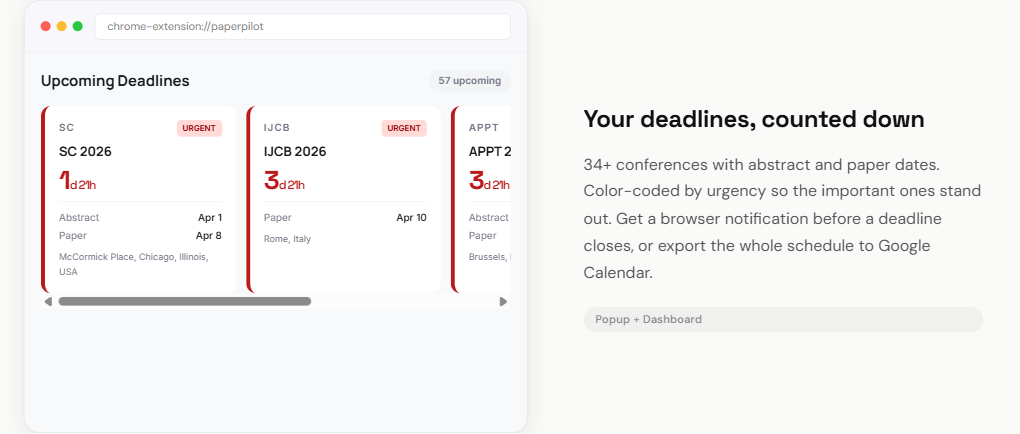
The single most effective thing you can do is stop relying on memory and bookmarks. A dedicated deadline tracker aggregates all conference dates in one place and shows you live countdowns so you always know exactly how much time remains.
PaperPilot is a free browser extension that places a deadline strip right inside Overleaf, showing your upcoming deadlines with color-coded urgency indicators. Red means less than a week, amber means less than a month, and green means you have time to plan.
You can also use PaperPilot's web-based deadline tracker, which covers over 1,200 conferences across computer science with filters for field, rank (using ICORE 2026 rankings), and organization. It is free and does not require any installation.
The key is to check your tracker regularly - ideally, it should be visible in your daily workflow so you do not have to remember to check it.
2. How do I export deadlines to Google Calendar?
Even with a dedicated tracker, having deadlines in your calendar means you get push notifications on your phone and reminders in your inbox. This adds a second layer of defense.
PaperPilot lets you add any conference deadline to Google Calendar with a single click, or download an .ics file for Apple Calendar, Outlook, or any other calendar app. The calendar event includes the conference name, deadline time, and a link to the submission page.
Set a reminder for two weeks before the deadline (to finalize your draft) and another for two days before (for a final check). These reminders act as safety nets even if you lose track of your regular workflow.
3. Why should I track abstract and paper deadlines separately?
This is the mistake that catches even experienced researchers. Many top-tier conferences - including CHI, NeurIPS, AAAI, and EMNLP - have a separate abstract submission deadline that falls one to two weeks before the full paper is due. If you miss the abstract deadline, you cannot submit the paper at all.
Make sure you are tracking both dates for every conference you are targeting. In PaperPilot's deadline tracker, both abstract and paper deadlines are shown on each conference card when both are available, so you always see the real first deadline you need to hit.
A good rule of thumb: treat the abstract deadline as your primary deadline. If your abstract is ready, you can always refine the paper in the remaining days. But no abstract means no submission, period.
4. How do I use a kanban board to plan backwards from the deadline?
Knowing when a deadline is and actually being ready for it are two different things. Backwards planning is the technique of starting with the deadline and working backwards to figure out when each task needs to start.
For example, if a paper is due September 15:
- September 10-15: Final revisions, formatting, camera-ready polish
- September 1-10: Co-author review and feedback cycle
- August 15-31: Write results and discussion sections
- August 1-15: Data analysis and figure creation
- July: Run experiments, collect data
- June: Finalize methodology, prepare materials
PaperPilot's kanban boards let you create these tasks as cards and link the entire project to the conference deadline. As you work through each stage, you drag cards forward. If tasks are piling up in the "To Do" column with the deadline approaching, you know immediately that you need to adjust your plan or narrow the paper's scope.
5. Why should I always check the deadline timezone?
This sounds trivial, but timezone confusion has cost many researchers their submissions. The most common deadline timezone in computer science is AoE (Anywhere on Earth), which is UTC-12. This is the most generous timezone - if it is still the deadline date anywhere on Earth, you are good.
But not all conferences use AoE. Some use UTC, some use the local time of the conference location, and some are not explicit about it at all. The difference between AoE and UTC can be up to 12 hours, which is often the difference between making a deadline and missing it.
PaperPilot's deadline tracker automatically converts all times to your local timezone and shows both the original and converted times. This removes all guesswork. When a deadline says "September 15, 11:59 PM AoE" and you are in Berlin, you can see exactly what time that is for you (September 16, 1:59 PM CEST) without doing the math.
How do I combine all five strategies?
No single strategy is bulletproof, but combining all five makes it nearly impossible to miss a deadline. Use a tracker for awareness, sync to your calendar for reminders, track both abstract and paper dates, plan backwards with a kanban board, and always verify the timezone.
PaperPilot is free and handles most of this automatically. Install it once and you have deadline tracking, calendar export, kanban boards, and timezone conversion built into your Overleaf workflow. The five minutes it takes to set up will save you from months of frustration.